When I was working in my previous company, we had CapLoader, and man, life was smooth. It makes analyzing massive flows so easy. But then you look at the price tag for a personal license and... bas, dream over!
I couldn't just go back to squinting at Wireshark lines all day. So, I decided to "vibe code" my way out of this problem. I wanted that same "big company" power but without the "big company" bill.
Here’s the updated take on why I built PCaptor - the PCAP analyzer.
PCaptor: The "Poor Man's" CapLoader (But Faster!)
If you’ve ever used CapLoader, you know the vibe: it’s all about the flows, not just the packets. It’s powerful, it’s easy, and it’s also very expensive. Now that I’m back in Bangalore and tinkering in my own lab, I needed that same ease of use without the heavy license fee.
So, I built PCaptor—an open-source, free-as-in-chai at office, alternative inspired by the best parts of the enterprise stuff.
Why it’s my new favorite tool:
- CapLoader Vibe, Zero Cost: I designed this specifically to give you that high-level flow analysis. It handles up to 1,000,000 flows without breaking a sweat.
- Chews Through Gigabytes: Remember how CapLoader could open a 5GB file while other tools just crashed? PCaptor is written in Go with a worker pool architecture. It handles 75,000+ packets per second and manages memory like a pro (capped at 8GB).
- Smart Detection (The "Secret Sauce"): It doesn't just show traffic; it hunts. I’ve baked in JA3/JA4 TLS fingerprinting and beaconing detection. If a C2 is hiding in your network, PCaptor will sniff it out.
- Automatic Everything: It extracts files, certificates, and credentials automatically. No more manual carving!
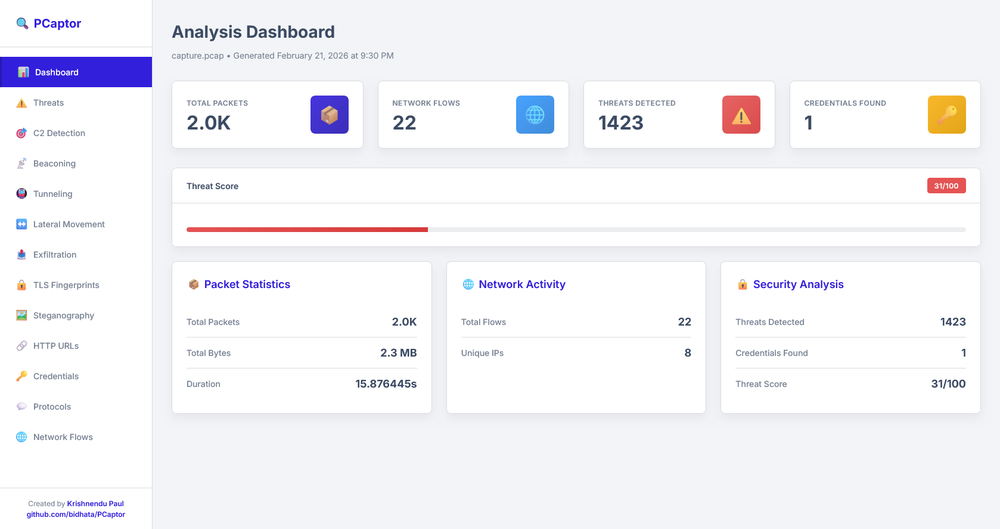
- Reporting That Actually Makes Sense: It spits out an interactive HTML dashboard, JSON for your SIEM, or CSVs if you’re a spreadsheet warrior.
- From Packets to Conversations: Instead of thousands of lines, PCaptor groups everything into flows. You see the source, the destination, the duration, and the "baat-cheet" (conversation) between them.
- Protocol Intelligence: Just like the expensive stuff, PCaptor doesn’t just trust the port number. If someone is running a C2 over port 80, it won't just blindly call it "HTTP." It looks at the actual behavior to tell you what’s really going on.
- The "Top Talkers" Dashboard: I’ve mimicked that high-level overview where you can immediately see who is hogging the bandwidth or which internal IP is suddenly talking to a suspicious server in the middle of the night.
- Flow Statistics (The "X-Ray" View): We’re talking packet counts, byte distributions, and timing analysis. This is how you catch those sneaky beacons that try to hide by being "quiet."
- Zero-Friction Filtering: In the company, we loved how fast we could filter out the "noise." PCaptor’s engine is tuned to let you pivot from a 5GB file to a specific suspicious flow in seconds.
The Best Part?
It’s a single binary. No "install this library, update that dependency" drama. Just download and start hunting.
Since I’ve used the expensive tools in my professional life, I’ve tried to bring that same "easy-to-analyze" logic into this project. It’s built by a security pro, for security pros (and CTF addicts!).
Check it out on GitHub:https://github.com/bidhata/PCaptor
If you’re missing those "expensive company tool" features in your home lab, give PCaptor a spin. Linux and Windows, both versions are available. It’s my way of giving back to the community—and keeping my own sanity while hunting threats!
#PCaptor #CyberSecurity #CapLoader #OpenSource #RedTeam #GoLang #ThreatHunting #VibeCoding #MadeInIndia